
Motorcycle lean angle overlay from a GoPro or data logger
How lean angle is calculated
Section titled “How lean angle is calculated”When a bike corners, it leans so that gravity and the cornering force balance. Knowing your speed and how fast you’re turning is enough to work out that angle:
- Moving (above about 3 m/s, roughly 11 km/h): lean comes from GPS speed times the gyro’s turn rate.
- Walking pace (below about 1.5 m/s): lean comes from the accelerometer’s sense of which way is down.
- In between: the two are blended, so the gauge doesn’t jump as you pull away.
- From a logger: if your RaceBox, RaceChrono or AiM file records its own lean channel, that’s used instead.
The result is limited to plus or minus 70 degrees, well beyond what a road or track bike reaches.
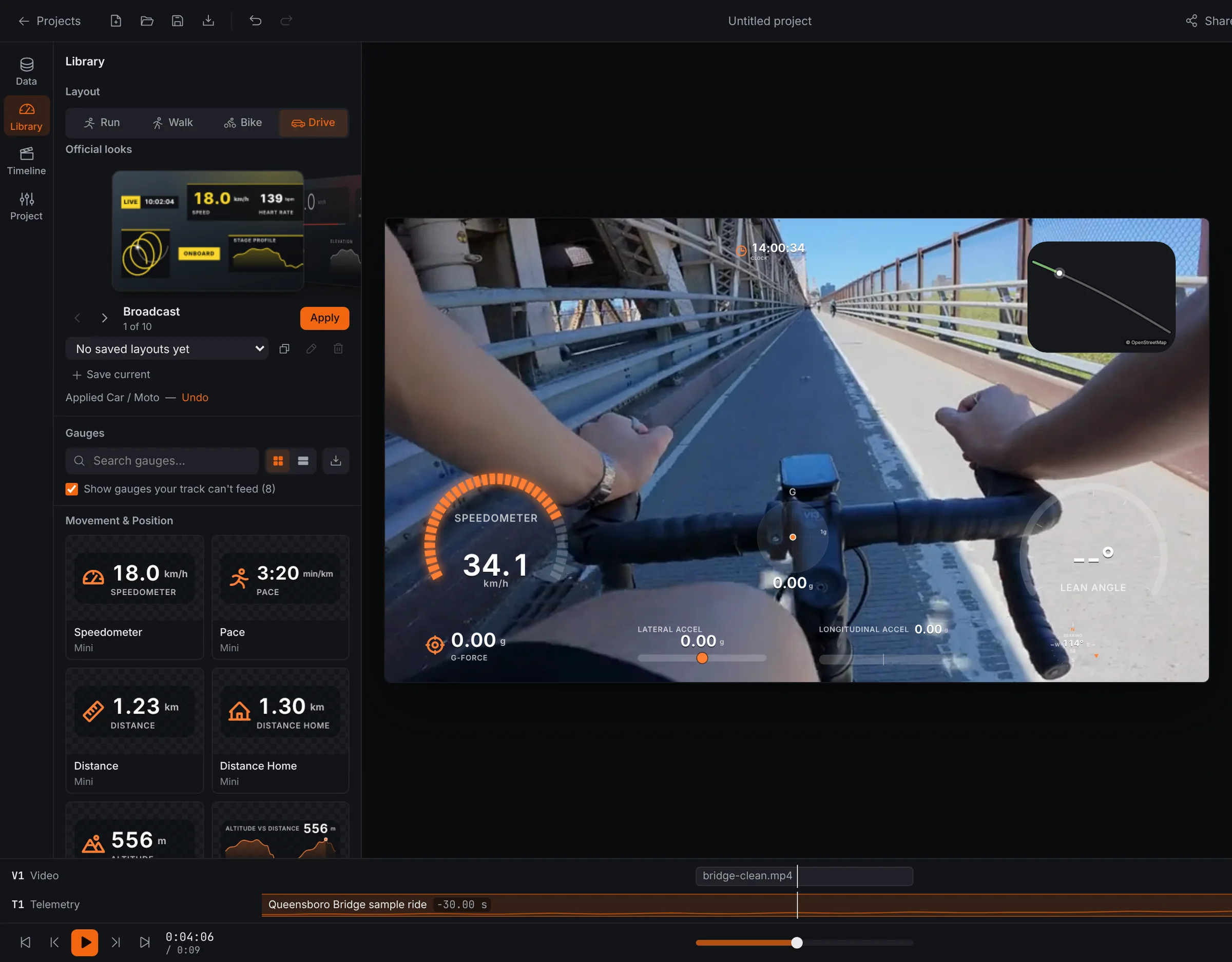
- Drive layout
- Car / Moto layout applied
- Speedometer
- Lateral and longitudinal g
- Lean angle (needs gyro or logger data)
Which camera and data you need
Section titled “Which camera and data you need”| Setup | Lean angle | Notes |
|---|---|---|
| GoPro HERO5 Black to HERO11, HERO13 Black, bike-mounted | Good | Gyro plus the camera’s own GPS |
| GoPro HERO12 Black, bike-mounted | Reads low in long corners | No GPS; add a logger or GPX for speed |
| Any GoPro on a helmet or chest | Not the bike’s lean | Measures your head or body |
| RaceBox, RaceChrono or AiM file with a lean channel | Good | Logger’s own value is used |
| Phone GPX or watch FIT only | No lean | No gyro data; speed and route only |
If your track only has GPS, the gauge library shows Lean Angle as No data, so you know before you export:
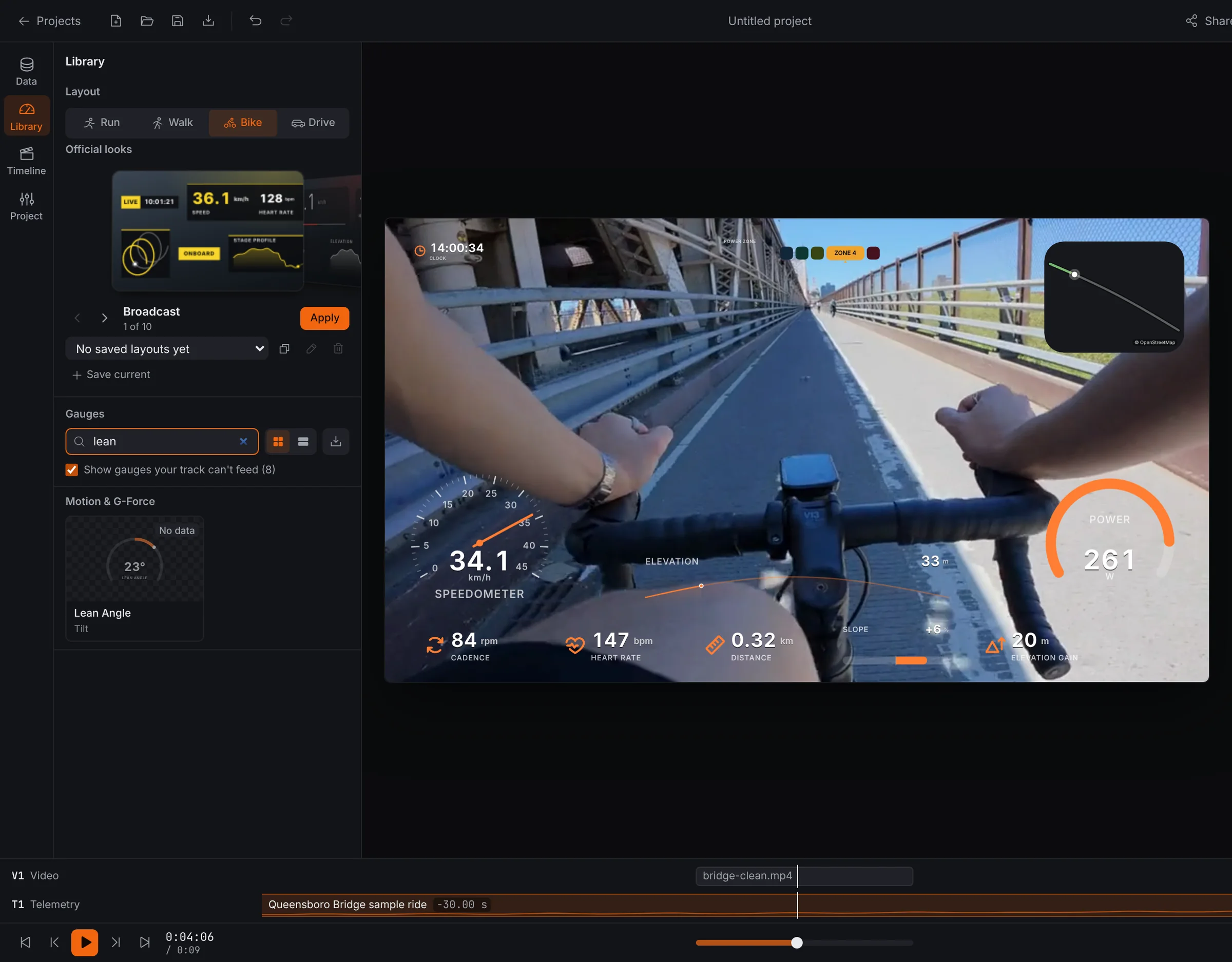
- Search the gauge library
- Show gauges your track cannot feed yet
- Lean Angle reads No data without IMU data
Motorsport overlay tools compared
Section titled “Motorsport overlay tools compared”| App | Runs on | Lean angle from GoPro sensors | Lap timer | Free use | Price |
|---|---|---|---|---|---|
 GaugeReel | Windows, macOS, browser | Yes (Premium) | Yes (Premium) | No watermark, 1080p30, core gauges | Premium $20/mo or $170/yr |
 Telemetry Overlay | Windows, macOS, Linux | – | – | 3-day trial with watermark | $199 one-time |
 RaceRender | Windows, macOS | – | Yes | 3-minute cap and logo | $39.95 to $59.95 |
 StintBox | Windows, macOS, Linux | – | – | Watermark, 5-minute cap | €99 per 6 months, €349 perpetual |
Checked November 13 to 24, 2026. A dash means we couldn't confirm it from the vendor's own pages.
How to add a lean angle overlay
Section titled “How to add a lean angle overlay”-
Mount the camera on the bike. Tank, bars, fairing or a rear mount, pointing forward and as level as you can. Make sure GPS is on in the GoPro’s preferences.
-
Add the clip. In the web editor or desktop app, choose GoPro video. The channel list should show GPS, accelerometer and gyro.
-
Add logger data if you have it. A RaceBox, RaceChrono or AiM file adds 10 to 25 Hz speed for sharper braking points. Add it as an Activity file and sync it to the clip.
-
Apply the Car / Moto layout. Open the library, choose Drive, then Car / Moto. It places a speedometer, g-force, lateral and longitudinal acceleration and lean angle.
-
Add lap gauges (Premium). Lap Timer, Lap Delta and Lap List show your current lap against your best. The Friction Circle shows how much grip you’re using.
-
Export. At up to 4K or 8K on Premium, as a transparent layer or burned into the video. Premium also sends the layers straight to DaVinci Resolve.
Tips for believable lean numbers
Section titled “Tips for believable lean numbers”- Level the camera before the session. A tilted mount shifts every reading.
- Check a known corner. Most road riding stays well under 45 degrees; fast riders on track tyres reach the 50s. A reading of 65 on a roundabout means the mount moved.
- Keep the original MP4. Exports from other apps usually lose the gyro data.
- Don’t oversell it. Label it as estimated lean if you post it publicly. It’s close, not a calibrated measurement.
For GoPro-specific setup, see GoPro GPS by model and the GoPro telemetry overlay page.
Frequently asked questions
Section titled “Frequently asked questions”Can a GoPro measure lean angle?
Not directly, but it records what's needed to work it out. GaugeReel calculates lean from the GoPro's gyro and GPS speed while moving, and from its accelerometer at walking pace, so a bike-mounted GoPro with GPS gives a lean angle gauge with no extra hardware.
Where should I mount the GoPro for lean angle?
Fixed to the bike, facing forward, such as on the tank, the bars or a fairing mount. A helmet or chest camera moves with your head and body, so the angle it reports is your head's, not the bike's.
Why does lean angle read low on my GoPro HERO12?
The HERO12 Black has no GPS, and the calculation needs speed. Without it, GaugeReel falls back to the accelerometer, which reads low in long, steady corners. Pair the clip with a GPS logger file to fix it.
Can I use a RaceBox or RaceChrono file?
Yes. GaugeReel imports VBO and CSV files from RaceBox, RaceChrono, AiM and similar loggers. They drive speed, g-force and the route at 10 to 25 readings a second, and the logger's own lean channel is used when the file has one.
Is the lean angle gauge free?
No. Lean Angle, Friction Circle, Yaw Rate and the lap gauges are on GaugeReel Premium ($20 a month or $170 a year). Speed, g-force and lateral and longitudinal acceleration are free.
How accurate is a GoPro lean angle?
Close enough for video, not for engineering. It assumes a level camera, steady GPS and a coordinated turn, and it's limited to plus or minus 70 degrees. Expect a few degrees of difference from a dedicated IMU logger.
See your lean angle on your own laps
The Free plan has no watermark and no time limit. Open the editor in your browser, or download it for Windows or macOS.