
Telemetry overlay software compared: Telemetry Overlay, Telemetry Studio, OVRLEY and more
We make GaugeReel, so weigh our view accordingly. Every fact about other products below comes from the vendor’s own site, pricing page or release notes, checked between November 13 and 24, 2026. Where we couldn’t confirm something, the table shows a dash.
Price, platforms and free use
Section titled “Price, platforms and free use”| App | Runs on | Price | Free use | Best for |
|---|---|---|---|---|
 GaugeReel | Windows, macOS, browser | Free; Basic $10/mo, Premium $20/mo | No watermark, no time limit, 1080p30 | Desktop editors who want a clean free plan, Strava and Resolve |
 Telemetry Overlay | Windows, macOS, Linux | $199 one-time | 3-day trial, watermark | Unusual camera and logger formats |
 Telemetry Studio | Windows, macOS | $79 one-time, 3 devices | 14-day trial, watermark | Polished cycling and running designs |
 OVRLEY | Windows, macOS, Linux | Free, open source | Everything | Free desktop overlays with custom widgets |
 Stamptivity | Browser | Free | No watermark | Quick GPX or FIT overlays, nothing to install |
 RaceRender | Windows, macOS | $39.95 to $59.95 one-time | 3-minute cap, logo | Motorsport and lap timing |
 StintBox | Windows, macOS, Linux | €99 per 6 months, €179/yr, €349 perpetual | Watermark, 5-minute cap | A large widget library |
 GpxOverlay | Browser | $39 per 3 months to $179 lifetime | None | GPX-first users who want a lifetime option |
Prices from each vendor's pricing page, November 13 to 24, 2026. Prices change; check before you buy.
Features side by side
Section titled “Features side by side”| App | GoPro GPS from the MP4 | FIT and GPX | Transparent export | Strava import | Send to Resolve |
|---|---|---|---|---|---|
| GaugeReel | Yes | Yes | Free (PNG, green screen); Basic (ProRes, WebM) | Basic | Premium |
| Telemetry Overlay | Yes | Yes | Paid license | – | No |
| Telemetry Studio | – | Yes | ProRes (paid) | Pairing (per vendor) | No |
| OVRLEY | Yes (v3.1) | Yes | Yes | Planned | – |
| Stamptivity | – | Yes | WebM alpha, green screen | – | No |
| RaceRender | – | Yes | – | – | No |
A dash means the vendor's own pages didn't confirm it either way. Send to Resolve means placing layers in an open DaVinci Resolve timeline; every tool can export a file you import by hand.
Telemetry Overlay
Section titled “Telemetry Overlay”Telemetry Overlay is the long-standing all-rounder. It documents GoPro GPMF, GPX, KML, NMEA, IGC, CSV and VBOX inputs, and it can make finished videos or transparent layers. The $199 license is a one-time payment with a year of updates and support. The trial is short: three days, watermarked, and without transparent export. Pick it if your camera or logger writes a format nobody else reads.
Searching “telemetry overlay alternative”? The Telemetry Overlay alternative page compares it with GaugeReel in detail.
Telemetry Studio
Section titled “Telemetry Studio”Telemetry Studio is a different product from a different company, despite the similar name. It’s a design-led editor aimed at cycling and running, with transparent ProRes on the paid license, which covers three devices for $79. The trial lasts 14 days with watermarked exports. It’s the closest in style to GaugeReel; the differences are the pricing model (one payment versus a free plan plus subscriptions), GaugeReel’s browser editor and Resolve integration, and Telemetry Studio’s focus on endurance sports.
OVRLEY
Section titled “OVRLEY”OVRLEY is free and open source on Windows, macOS and Linux, and it ships fast. Version 3.1.5 (November 10, 2026) added a map widget, native GoPro, DJI and Insta360 extraction, batch export and a sync helper. Strava import and a browser version are listed as planned. If you’re comfortable with a hobby-project pace and want everything for free, it’s a strong choice.
Stamptivity
Section titled “Stamptivity”Stamptivity runs in the browser with no account and no watermark, and it processes files locally. It takes FIT, GPX and TCX tracks and exports MP4, WebM with transparency or green screen. It suits a quick overlay for a ride or run; check that your editor handles WebM transparency, as many desktop editors don’t.
RaceRender
Section titled “RaceRender”RaceRender is built for motorsport: lap timing, track maps and logger formats such as CSV, VBO, NMEA, GPX, TCX and FIT, and it pairs with the TrackAddict phone app. The interface feels dated and the last major version is from 2022. Free exports are limited to three minutes with a logo.
StintBox and GpxOverlay
Section titled “StintBox and GpxOverlay”StintBox is a 2026 newcomer with a large widget library and a choice of subscription or perpetual license; the free tier is watermarked and capped at five minutes. GpxOverlay is a GPX-focused browser tool with no free tier and a $179 lifetime option.
GaugeReel
Section titled “GaugeReel”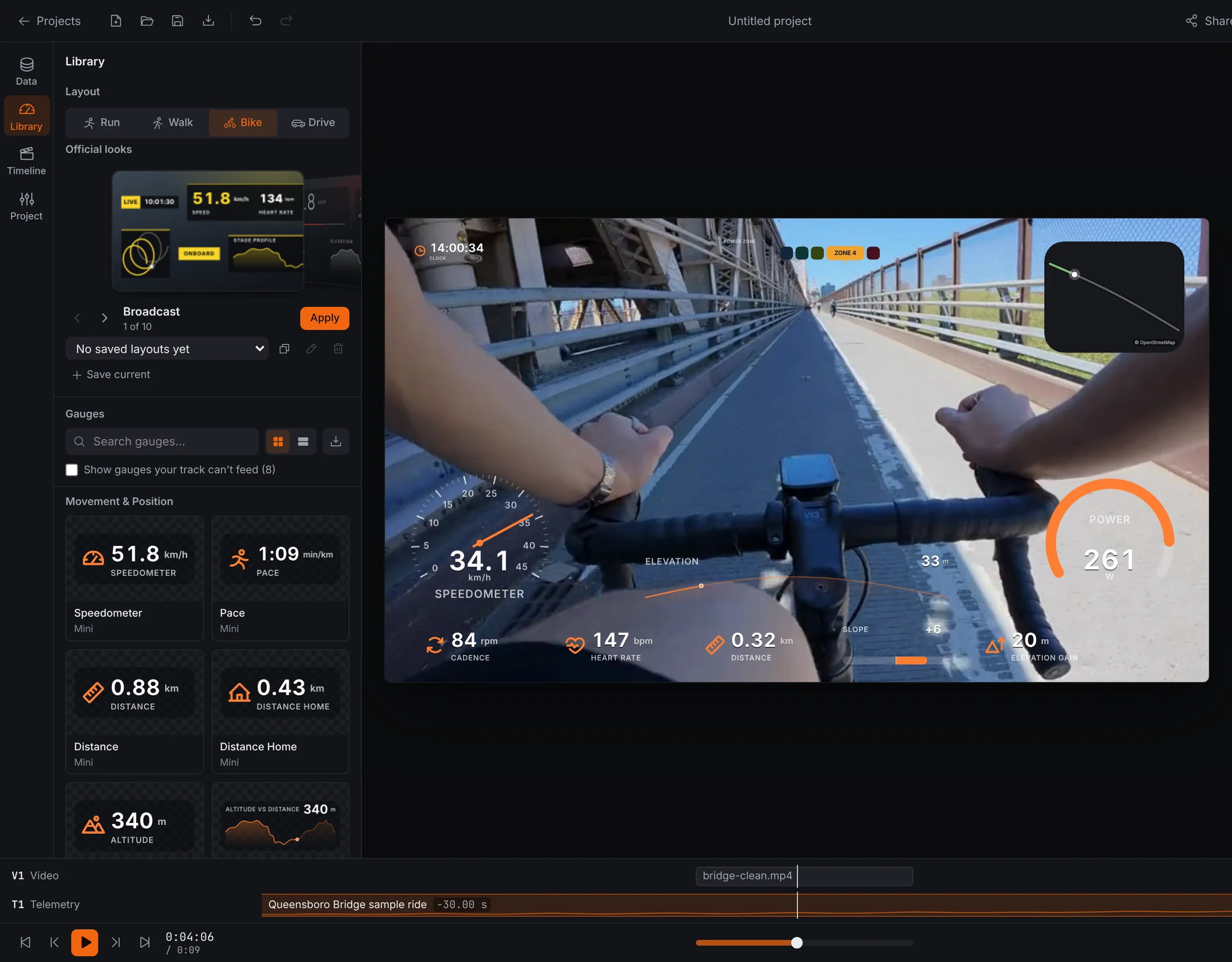
- Layouts for run, walk, bike and drive
- Official looks, one click to apply
- Search 40+ gauges
- Drag a gauge onto the video
GaugeReel’s Free plan keeps working with no watermark and no time limit: core gauges, a GPS route line, transparent PNG sequences and green-screen MP4, up to 1080p at 30 fps. Basic ($10 a month or $90 a year) adds Strava import, 60 fps, burned-in MP4 and ProRes, transparent ProRes 4444 and WebM, and map basemaps. Premium ($20 a month or $170 a year) adds 4K to 8K, motorsport gauges such as lean angle and lap delta, keyframes and Send to Resolve. A 3-day Event Pass for $12 covers a single trip.
Where it falls short: it doesn’t read drone flight logs, DJI’s GPS remote data or Insta360 INSV files, and maps and transparent video, which OVRLEY and Stamptivity give away, are paid here. The full feature list is on the best telemetry overlay software page, and plan details are on pricing.
How to choose
Section titled “How to choose”- You use a GoPro with GPS and edit on a computer: GaugeReel or OVRLEY, both free to start.
- Your data comes from an unusual logger or drone: Telemetry Overlay.
- You ride or run and care most about the look: Telemetry Studio or GaugeReel.
- You race and live by lap times: RaceRender, or GaugeReel Premium for lean angle and lap delta.
- You want to pay nothing, ever: OVRLEY, Stamptivity, or GaugeReel Free.
- You cut in DaVinci Resolve: GaugeReel Premium’s Send to Resolve saves the import steps.
For a free-only shortlist, see free telemetry overlay software.
Frequently asked questions
Section titled “Frequently asked questions”What is the best telemetry overlay software?
It depends on your data and budget. Telemetry Overlay reads the widest range of camera and logger formats for $199 once. OVRLEY and Stamptivity are free. RaceRender suits lap-timed motorsport. GaugeReel combines a watermark-free Free plan, GoPro GPS from the MP4, Strava import, a browser editor and Send to DaVinci Resolve.
How much does Telemetry Overlay cost?
Telemetry Overlay is $199 one-time, including one year of updates and support, as of November 2026. Its free trial lasts three days, watermarks exports and leaves out transparent export.
What's the difference between Telemetry Overlay and Telemetry Studio?
They are separate products from different companies. Telemetry Overlay ($199) focuses on broad format support across cameras and loggers. Telemetry Studio ($79 for three devices) is a design-led editor aimed at cycling and running, with a 14-day watermarked trial.
Is there a free alternative to Telemetry Overlay?
Yes. GaugeReel Free has no watermark or time limit and exports up to 1080p at 30 fps. OVRLEY is free and open source on Windows, macOS and Linux. Stamptivity is free in the browser.
Which telemetry overlay apps work on a Mac?
GaugeReel, Telemetry Overlay, Telemetry Studio, OVRLEY, RaceRender and StintBox all have macOS versions. Stamptivity, GpxOverlay and GaugeReel's web editor run in a browser on any computer.
Which overlay software works with DaVinci Resolve?
All of them can export a file you import into Resolve. GaugeReel Premium is the only one we found that sends the layers straight into an open Resolve timeline.
Try GaugeReel free, no watermark
The Free plan has no watermark and no time limit. Open the editor in your browser, or download it for Windows or macOS.