
How to add a speedometer to a video, using real GPS speed
Looking to speed up or slow down your video instead? That’s playback speed, and it lives in your editor’s speed or retime tool (in CapCut, select the clip and tap Speed). This guide is about showing how fast you were actually moving.
Where the speed comes from
Section titled “Where the speed comes from”| Source | Readings per second | Good for | File |
|---|---|---|---|
| GoPro HERO5 Black to HERO11, HERO13 Black | 10 to 18 | Bikes, boards, cars, anything | Inside the MP4 |
| Phone GPS app (Strava and others) | About 1 | Rides, runs, drives | GPX |
| Watch or bike computer (Garmin, Wahoo, COROS) | About 1 | Rides and runs, with heart rate | FIT |
| Car or motorbike logger (RaceBox, RaceChrono) | 10 to 25 | Track days, braking points | VBO or CSV |
| Camera GPS remote (DJI, Insta360) | Varies | Use the camera’s own app | Kept with the footage |
A HERO12 Black has no GPS, so pair it with one of the files above; see GoPro GPS by model.
Speedometer apps compared
Section titled “Speedometer apps compared”| App | Speed comes from | Speedometer styles | Runs on | Price |
|---|---|---|---|---|
 GaugeReel | GoPro GPS, GPX, FIT, VBO, CSV, Strava | Needle dial, tape, digital and more | Windows, macOS, browser | Free; Basic $10/mo |
 GoPro Quik | GoPro GPS | Stickers | iPhone, Android | Free app; subscription for more |
 DJI Mimo | DJI GPS remote | Dashboard templates | iPhone, Android | Free |
 Insta360 app | Insta360 GPS remote, watch, FIT/GPX | Stats Dashboard templates | iPhone, Android | Free |
 RaceRender | Logger and GPS files | Customisable gauges | Windows, macOS | $39.95 to $59.95; free version has a 3-minute cap and logo |
Checked November 13 to 24, 2026, on each vendor's site.
How to add a speedometer in GaugeReel
Section titled “How to add a speedometer in GaugeReel”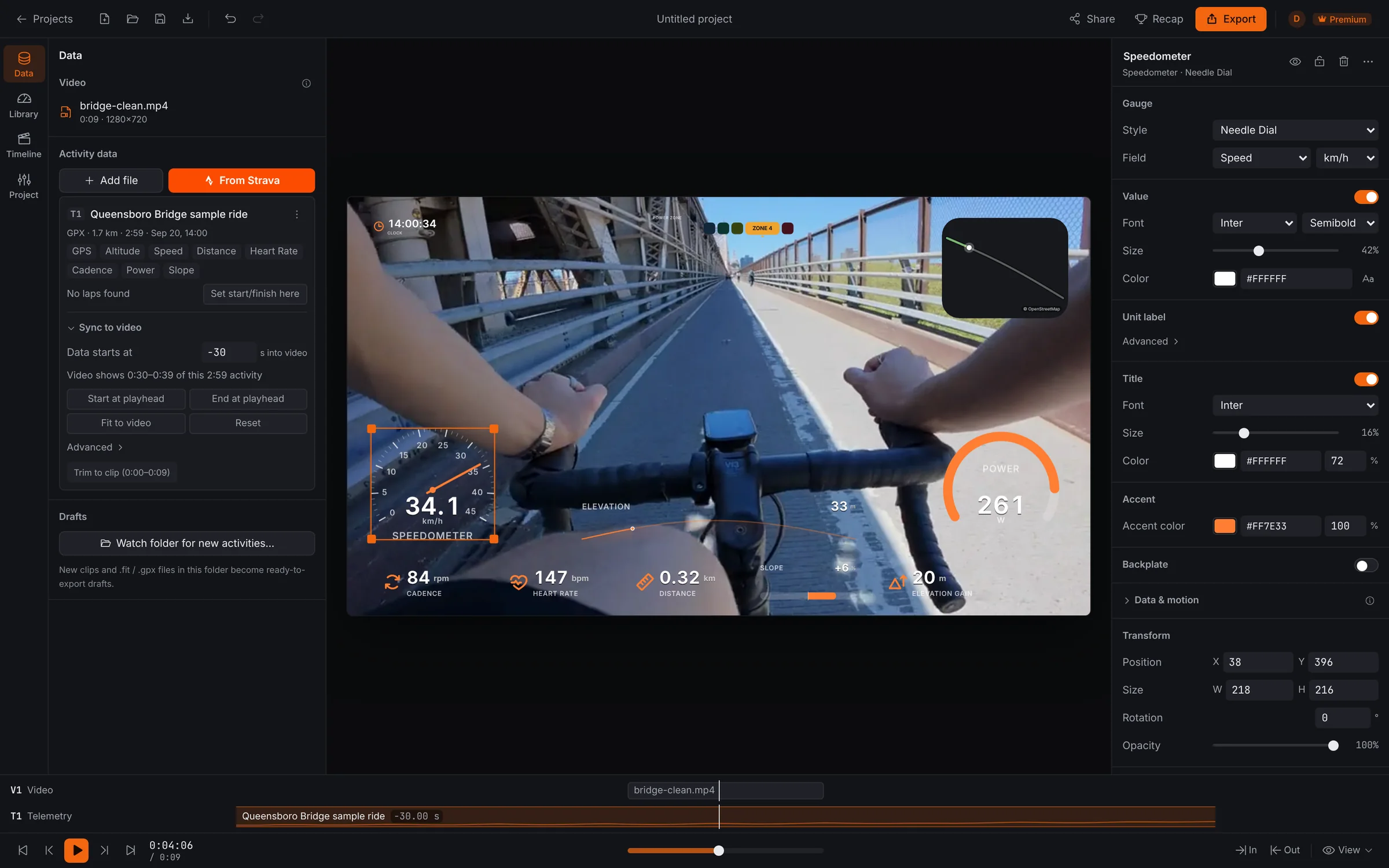
- Click a gauge to select it
- Style: needle dial, tape, digital and more
- Field and unit (speed in km/h or mph)
- Font, size and colour of the value
- Accent colour
- Position, size, rotation and opacity
-
Add your clip and your speed data. Open the web editor or the desktop app. For a GoPro with GPS, choose GoPro video. Otherwise add the clip, then choose Activity file and pick the GPX, FIT, VBO or CSV.
-
Line up the timing. GoPro GPS is already in sync. For a separate file, apply the suggested sync and check it against a stop or a pull-away; see syncing GPS with video.
-
Add a speedometer. Apply a layout, which includes one, or search the gauge library for Speedometer and drag it onto the video.
-
Style it. Click the gauge. Choose a needle dial, tape or digital readout, set mph or km/h, and change the font, colours, size and position. The GoPro tutorial walks through styling in more depth.
-
Export. Free exports a transparent PNG sequence or a green-screen MP4 to stack in your editor. Basic burns the speedometer into a finished MP4 and adds 60 fps.
Speedometer in DaVinci Resolve, Premiere Pro or Final Cut
Section titled “Speedometer in DaVinci Resolve, Premiere Pro or Final Cut”None of the big editors can read GPS speed by themselves. Make the speedometer in GaugeReel, export it on a transparent background, and put it on the track above your footage. On Premium, Send to Resolve places the layers straight into your open DaVinci Resolve timeline. Details for each editor are in transparent overlays by editor.
Speedometers for cars and motorbikes
Section titled “Speedometers for cars and motorbikes”For track days, a logger beats phone GPS: 10 to 25 readings a second means braking and corner speeds land on the right frame. The Drive layout adds g-force alongside the speedometer, and Premium adds lean angle, lap timer and lap delta gauges.
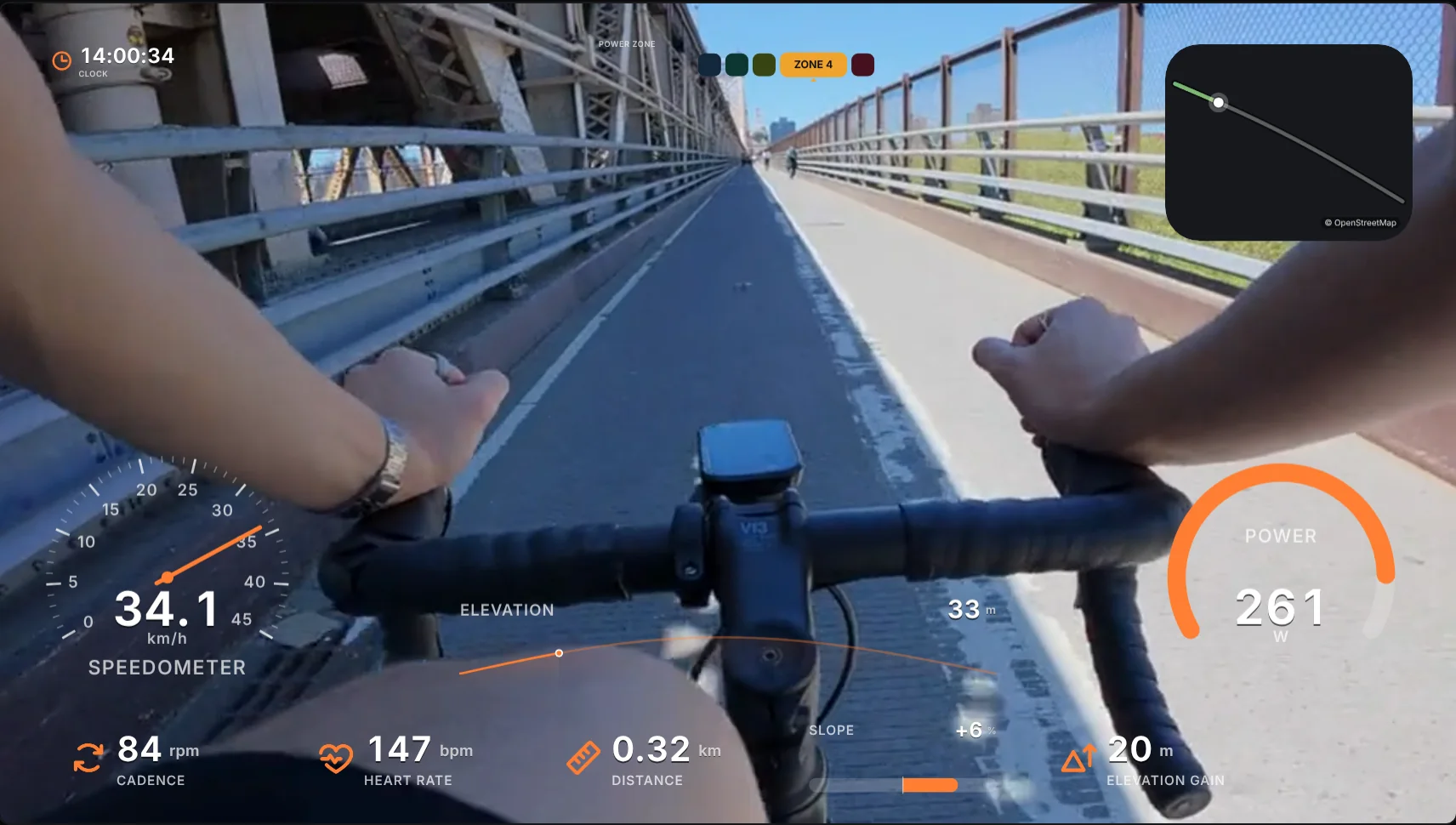
For more ways to add numbers to a clip, see how to add stats to a video.
Frequently asked questions
Section titled “Frequently asked questions”How do I add a speedometer to a video?
You need speed data recorded at the same time as the video: GPS inside a GoPro clip, or a GPX, FIT, VBO or CSV file from a phone, watch, bike computer or logger. Add the clip and the data to an overlay editor such as GaugeReel, line up the timing, pick a speedometer style, and export.
Can I add a speedometer to a video without GPS data?
Not an accurate one. Software can't measure speed from the picture, so a speedometer needs a GPS or logger recording of the same moment. If you didn't record one, a typed-in number or a static caption is the honest option.
How do I add a speedometer to an iPhone video?
Record the ride or drive with a GPS tracking app, such as Strava, while you film, then export the GPX file. Add the iPhone clip and the GPX to GaugeReel in your browser, line up the timing, and export the video with a speedometer.
Can I add speed to a video in CapCut?
CapCut's speed tool changes playback speed; it has no GPS speedometer. Make the speedometer in GaugeReel, export it as a green-screen MP4, put it on top of your clip in CapCut and remove the green with chroma key.
Can I show speed in mph instead of km/h?
Yes. Select the speedometer and change the unit in the inspector. Each gauge has its own unit, so you could show mph and km/h side by side.
Is there a free speedometer overlay?
Yes. The speedometer is on GaugeReel's Free plan with no watermark, exported up to 1080p at 30 fps as a transparent PNG sequence or a green-screen MP4.
Add a speedometer to your clip
The Free plan has no watermark and no time limit. Open the editor in your browser, or download it for Windows or macOS.