
Heart rate overlay for video: show your bpm on ride and run footage
Getting a file with heart rate in it
Section titled “Getting a file with heart rate in it”| Device | How to get the file | Has heart rate? |
|---|---|---|
 Garmin Connect Garmin watch or Edge |
Garmin Connect website: gear icon, Export Original (FIT) | Yes, with a wrist sensor or strap |
| Wahoo, COROS, Polar, Suunto | Export the FIT from the companion app or website, or from Strava | Yes, if a sensor was connected |
| Apple Watch | Sync to Strava and export there, or a Health export app such as HealthFit (FIT) | Yes, in Export Original or FIT |
 Strava Strava (any device) |
Activity page: three-dot menu, Export GPX or Export Original | GPX often does; Export Original always keeps it |
Detailed steps are in Garmin data on video, Strava stats on video and the Apple Watch video overlay page.
Heart rate overlay tools compared
Section titled “Heart rate overlay tools compared”| App | Heart rate from | Zone colours | Footage from any camera | Price |
|---|---|---|---|---|
 GaugeReel | FIT, GPX, Strava import | Yes (Basic) | Yes | Free; Basic $10/mo |
 Insta360 app | Garmin, Apple Watch, FIT/GPX | – | Insta360 only | Free |
 Stamptivity | FIT, GPX, TCX | – | Yes | Free |
 Telemetry Studio | Activity files | – | Yes | $79 one-time |
Checked November 13 to 24, 2026. A dash means we couldn't confirm it from the vendor's own pages.
How to add a heart rate overlay in GaugeReel
Section titled “How to add a heart rate overlay in GaugeReel”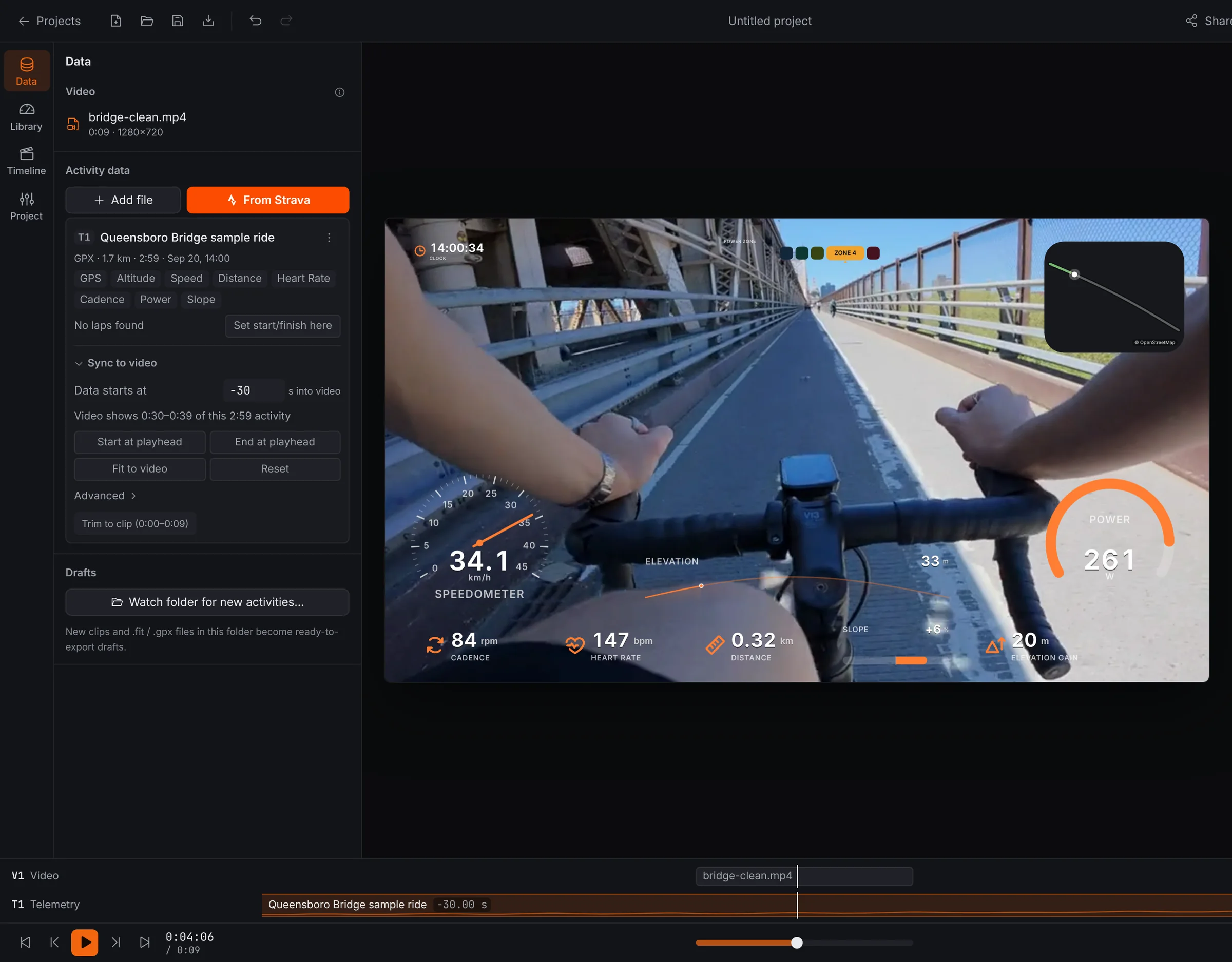
- Data offset: the track starts 30 s before the clip
- Speedometer, needle dial
- Heart rate, cadence and distance
- Power
- Heart rate zone
- GPS route map
-
Add your clip, then the activity file. Open the web editor or the desktop app, add the video, choose Activity file and pick the FIT or GPX. The channel list shows straight away whether heart rate came through.
-
Line up the timing. Apply the suggested sync, then check it against a moment you can see. Heart rate lags effort by a few seconds, so sync on speed (a stop or a pull-away), not on the heart rate itself. See syncing GPS with video.
-
Add the heart rate gauge. The Bike and Run layouts include one. Or search the library for Heart Rate and drag it onto the video. Click it to change its style, colour and size.
-
Add zones (Basic). The Heart Rate Zones gauge colours your effort by zone, which reads well on hill climbs and intervals.
-
Export. A transparent layer for your editor (free as a PNG sequence or green-screen MP4), or a finished MP4 with the gauges burned in (Basic).
Heart rate with GoPro GPS
Section titled “Heart rate with GoPro GPS”A GoPro records GPS but not heart rate, so you’ll often have two sources: the GoPro’s own GPS for speed and the route, and a watch file for heart rate. Add both. Each gauge picks its data source, and only the watch file needs syncing.
Make heart rate easy to read
Section titled “Make heart rate easy to read”- Put it near the speed. Viewers compare effort with speed, so keep the two together.
- Show zones on climbs. A colour change says more than a number going from 162 to 171.
- Mind the lag. Heart rate rises for 10 to 30 seconds after an effort starts. That’s physiology, not a sync problem.
- Don’t fake it. If the sensor dropped out, the gauge shows no data for that stretch. Better a gap than a made-up number.
Frequently asked questions
Section titled “Frequently asked questions”How do I overlay heart rate on a video?
Record the activity with a heart rate sensor while you film, export the FIT or GPX file, add it and the clip to an overlay editor such as GaugeReel, line up the timing, add a heart rate gauge and export.
Can I put Apple Watch heart rate on a video?
Yes. Apple's Health app has no per-workout file export, so sync the workout to Strava and export it on strava.com, or export a FIT file with a Health export app such as HealthFit. Then add the file to GaugeReel with your clip.
Why is there no heart rate in my GPX file?
Heart rate is only in the file if a sensor recorded it and the export kept it. If a GPX from Strava has none, try Export Original, which gives the device's own file, usually a FIT with heart rate.
Can GoPro record heart rate?
No. GoPro cameras record GPS, accelerometer and gyro data, but not heart rate. Record heart rate on a watch, bike computer or chest strap and pair that file with the GoPro clip.
Is the heart rate overlay free?
The heart rate gauge is on GaugeReel's Free plan, with no watermark, up to 1080p at 30 fps. The heart rate zone gauge, which colours your effort by zone, is on Basic.
Show your heart rate on your footage
The Free plan has no watermark and no time limit. Open the editor in your browser, or download it for Windows or macOS.