
How to add Strava stats to a video (Instagram, TikTok and YouTube)
Two ways to get your Strava activity in
Section titled “Two ways to get your Strava activity in”| Import from Strava | Export a GPX or FIT from Strava | |
|---|---|---|
| Plan | Basic ($10/mo or $90/yr) | Free |
| Steps | Pick the ride in a list, synced to your clip | Download the file on strava.com, then add it |
| Data | Speed, distance, route, altitude, heart rate, cadence, power (when recorded) | GPX: route, time, altitude, often heart rate. Original FIT: everything your device recorded |
| Best for | Making videos often | Trying it out, or the odd clip |
Strava video tools compared
Section titled “Strava video tools compared”| App | What it makes | Your own footage | Gets Strava data by | Price |
|---|---|---|---|---|
 GaugeReel | Gauges and route over your clip | Yes | Strava import (Basic) or a GPX/FIT file | Free; Basic $10/mo |
 Relive | 3D route flyover video | Clips placed along the route | Strava connection | Free; paid plan for more |
 Stamptivity | Stats overlay video | Yes | GPX, FIT or TCX file | Free |
 Telemetry Studio | Cycling and running overlays | Yes | Strava pairing (per vendor) | $79 one-time |
Checked November 13 to 24, 2026. Relive is a different kind of video: an animated map of the route rather than gauges on your footage. See GPX to video for that comparison.
Import a ride from Strava (Basic)
Section titled “Import a ride from Strava (Basic)”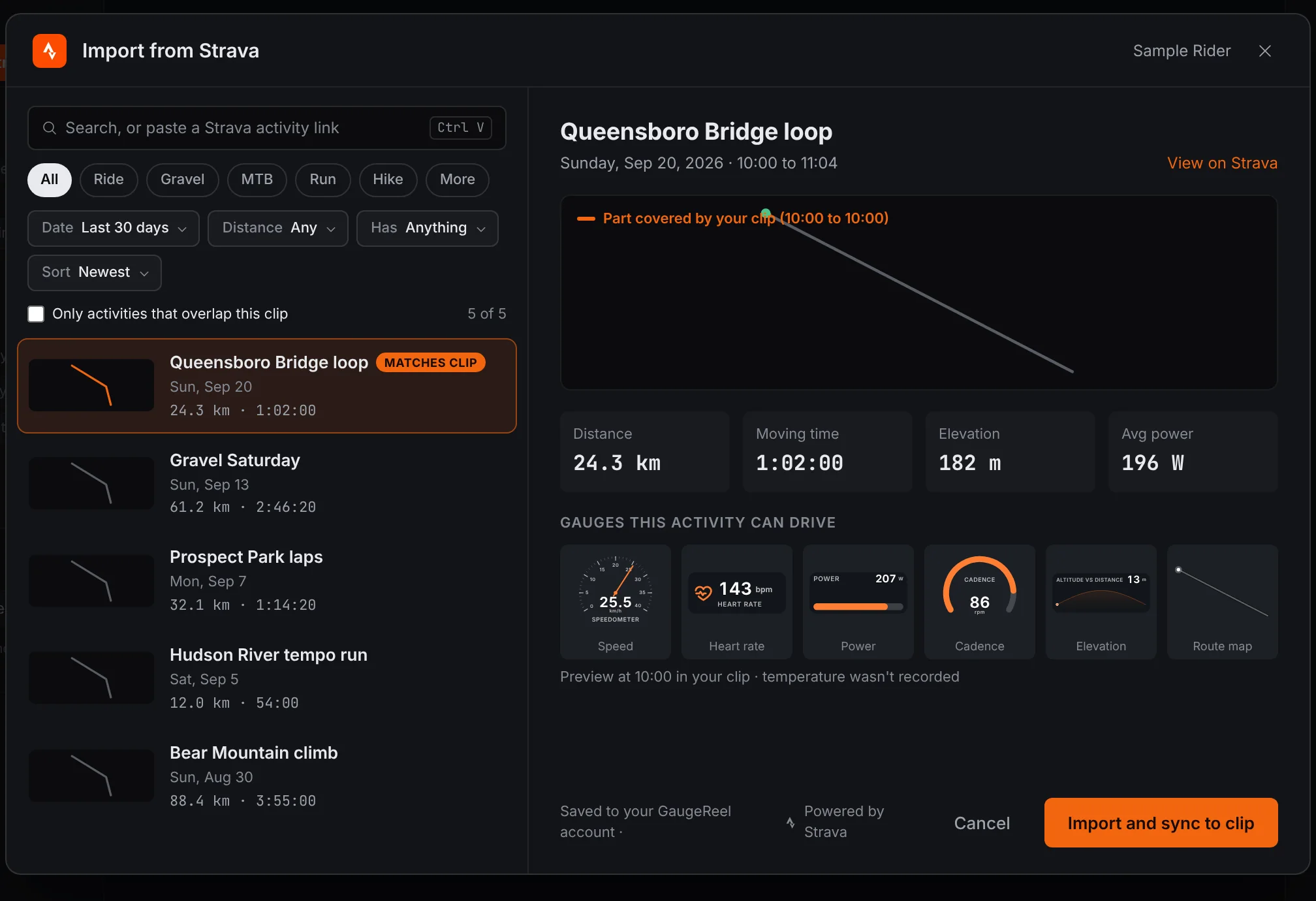
- Search, or paste a Strava activity link
- Filter by sport, date and distance
- Only show rides that overlap the clip
- The activity that matches your clip
- The part of the ride your clip covers
- Gauges this activity can drive
- Import and sync to the clip
-
Add your clip first. Open the web editor or the desktop app and add the video. GaugeReel uses its recorded time to find the matching ride.
-
Choose From Strava and connect your account. You sign in on Strava’s own page and approve read access to your activities.
-
Filter to rides that overlap the clip. Search, paste an activity link, or filter by sport, date and distance. The preview shows which part of the ride the clip covers and which gauges the activity can drive.
-
Import. The activity comes in already synced to the clip. Scrub to a stop or a turn and check the speed matches; nudge the data offset if not.
Use a free GPX export instead
Section titled “Use a free GPX export instead”-
Open the activity on strava.com. Strava’s export options are on the website, not in the phone app.
-
Click the three-dot menu and choose Export GPX. It is on the left side of the activity page. Choose Export Original instead if the ride came from a Garmin, Wahoo or other device: that’s the full FIT file, with heart rate and power.
-
Add the file in GaugeReel. Choose Activity file, pick the GPX or FIT, then line up the timing.
Make it vertical for Instagram Reels and TikTok
Section titled “Make it vertical for Instagram Reels and TikTok”Set the project to 1080 by 1920, apply the Run or Bike layout, and drag the gauges to suit the taller frame. Keep them clear of the top and bottom, where the app puts its buttons and captions. Then pick one of these exports:
- Burned-in MP4 (Basic): a finished video with the gauges and your audio, ready to post.
- Green-screen MP4 (Free): the gauges on solid green. Put it on top of your clip in CapCut, select it and use Chroma key to remove the green.
- Transparent PNG sequence (Free) or ProRes 4444 (Basic): for editors that handle transparency, such as DaVinci Resolve and Premiere Pro. See transparent overlays by editor.
Free covers vertical exports up to 1080 by 1920 at 30 fps, with no watermark. Basic raises that to 60 fps.
Strava stats on photos
Section titled “Strava stats on photos”For a still photo, Strava’s own share options are enough. This guide is about moving footage, where the numbers change with the clip. If what you want is an animated map of the whole route with no footage, see GPX to video.
For more on Strava with GaugeReel, see the Strava video overlay page.
Frequently asked questions
Section titled “Frequently asked questions”How do I add Strava stats to a video?
Open your clip in GaugeReel, then either import the activity from your Strava account (Basic plan) or export a GPX file from the activity on strava.com and add it for free. Line up the timing, choose gauges, and export a finished video or a transparent overlay.
How do I export a GPX file from Strava?
On strava.com, open the activity, click the three-dot menu on the left of the page and choose Export GPX. Export Original gives you the file your device recorded, often a FIT file with heart rate and power.
Can I put Strava stats on a TikTok or Instagram video?
Yes. Set the project to vertical 1080 by 1920 and burn the gauges into an MP4, or export a green-screen MP4 to key out in CapCut. Vertical exports up to 1080 by 1920 at 30 fps are on the Free plan.
How do I add Strava stats in CapCut?
CapCut doesn't read Strava data, so make the stats in an overlay tool first. Export them from GaugeReel as a green-screen MP4, add it to CapCut as an overlay on top of your clip, and use CapCut's chroma key to remove the green.
Is the Strava import free?
Importing straight from a Strava account is part of GaugeReel Basic ($10 a month or $90 a year). On the Free plan you can still use the same activity by exporting it from Strava as a GPX or FIT file.
Turn your Strava ride into a video
The Free plan has no watermark and no time limit. Open the editor in your browser, or download it for Windows or macOS.