Telemetry overlay online, free in your browser
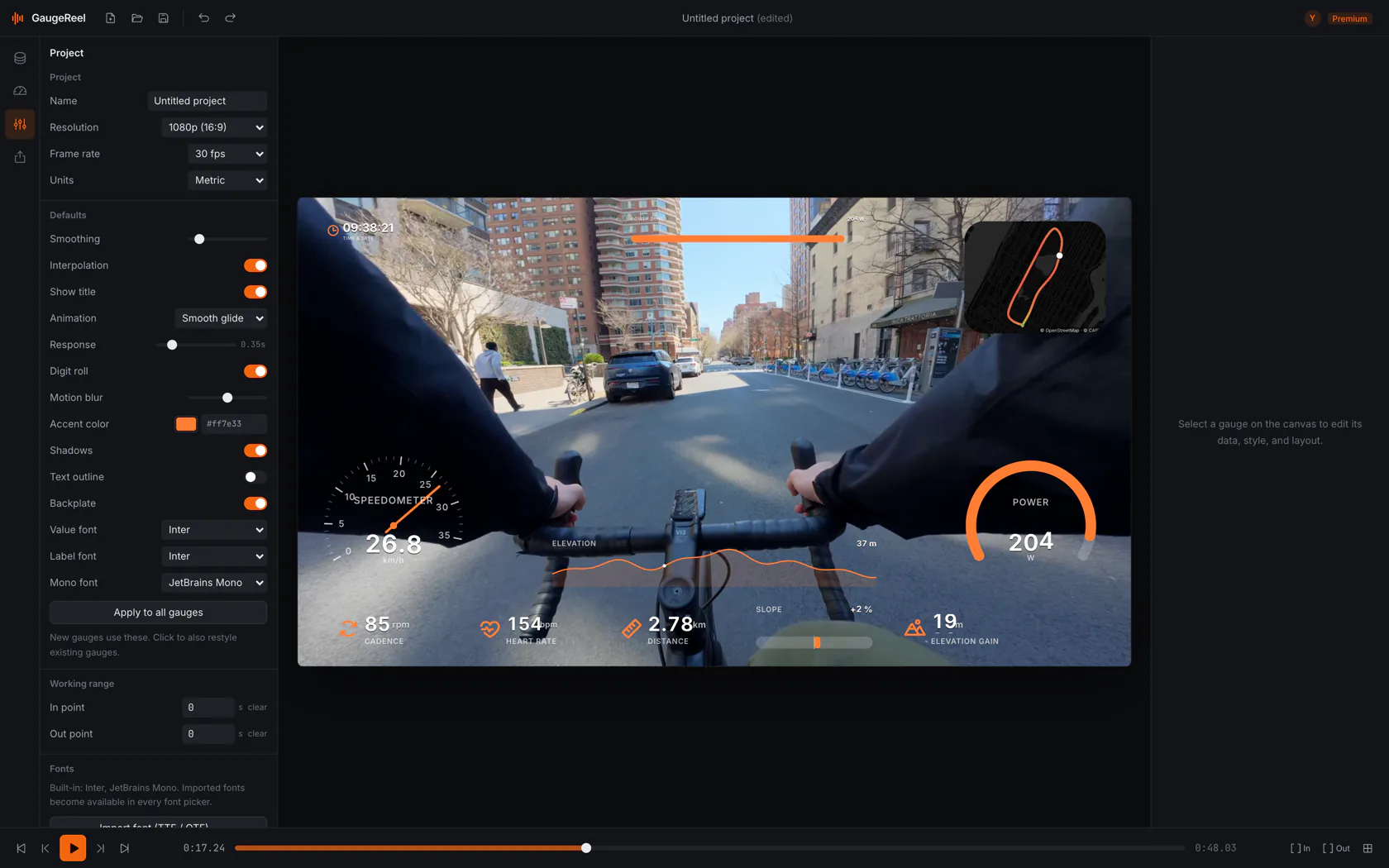
The full GaugeReel editor now runs in a browser tab. Put speed, heart rate and your GPS route on a video without installing anything, and without uploading your footage.
Free account · No install · No watermark · Files stay on your device
Three steps, no download
From an empty tab to an overlay you can drop into your video editor.
- 1
Sign in with a free account
Open the web app and sign in. There is nothing to install and no card to enter.
- 2
Add your video and your data
Pick a GoPro clip with GPS, or any clip plus the GPX or FIT file from your watch, bike computer or phone. The files are read on your device.
- 3
Place gauges and export
Drag gauges into place, line the data up with the action, and export a transparent PNG sequence or a green-screen MP4.
New to this? The beginner guide covers getting the file off your watch and finishing the video in CapCut, Clipchamp, DaVinci Resolve or Premiere Pro. Starting from a GPS track? See GPS video overlay.
What you get in the browser
The browser editor follows the same plans as the desktop app. Free stays free.
| Plan | Price | In the browser editor |
|---|---|---|
| Free | $0 | Core gauges, plain route line, transparent PNG sequence or green-screen MP4, up to 1920 × 1080 at 30 fps, no watermark |
| Basic | $10/month | Strava import, real map basemaps, full gauge styling, transparent ProRes 4444 and WebM, gauges burned into a finished video, 60 fps |
| Premium | $20/month | 4K to 8K exports, every gauge, keyframe animation, Send to DaVinci Resolve |
Anything outside your plan shows an upgrade prompt in the editor. Compare every plan.
Browser or desktop?
Same editor, same project files. Pick whichever suits the job, and switch whenever you like.
Use the browser when
- You are on a computer you cannot install software on
- You want to try GaugeReel in a minute
- You are on a phone, tablet or Chromebook
- The clip is short and the export is small
Use the desktop app when
- You do not want to make an account (Free needs none on desktop)
- You edit long clips or export large files
- You work without an internet connection
- You export ProRes often (the browser encodes it on the processor)
Projects made in the browser are saved in that browser only. Download the project file to open it in the desktop app. For exports larger than about 500 MB, use Chrome or Edge and pick a folder to save into.
Online editor questions
Is the online telemetry overlay editor free?
Yes. The browser editor is part of GaugeReel Free, an ongoing $0 plan with no watermark and no time limit. You need a free account to open it. Free exports a transparent PNG sequence or a green-screen MP4 up to 1920 × 1080 at 30 fps, the same limits as the desktop app.
Do I have to upload my video?
No. Your footage and activity files stay on your device. The browser reads them directly, works out the gauges and encodes the export locally. The editor goes online for your account, and for optional map tiles and street-name lookups.
Which browsers does it work in?
Any current browser on a computer, phone or tablet can open the editor. Chrome or Edge on a computer is the best choice, because they can save straight to a folder you pick, which large exports, folder watching and Send to DaVinci Resolve need. Other browsers save through normal downloads and depend on the video formats that browser can decode.
Can I make an overlay on my phone?
Yes. The editor opens on phones and tablets. A computer is more comfortable for long clips and large exports.
Where are my projects saved?
In the browser you made them in, on that device, under your account. They do not sync to other browsers or devices, and clearing site data removes them. Download the project file to keep a copy or move it to the desktop app.
How is it different from the desktop app?
It is the same editor, with the same gauges, looks and project files. The desktop app needs no account on Free, works offline and handles long exports more comfortably. The browser editor needs no installation.
Does it work offline?
No. The browser editor checks your account online while you work. The desktop app works offline, and on Free it needs no account at all.
What do the paid plans add in the browser?
The same things as on desktop. Basic ($10/month) adds Strava import, map basemaps, full gauge styling, transparent ProRes 4444 and WebM video, burned-in gauges and 60 fps. Premium ($20/month) adds 4K to 8K exports, every gauge, keyframe animation and Send to DaVinci Resolve. Features outside your plan show an upgrade prompt.
Make an overlay without installing anything.
Free with an account. No watermark, no time limit.